

Launching a new product is an exciting stage for any business, but creating a successful product launch requires more than simply putting the product online. Customers need to understand what the product looks like, how it works, what makes it different, and why they should consider buying it.
Professional product photography plays an important role in communicating all of these details.
For e-commerce brands especially, product images may be one of the first things a potential customer sees. A strong photograph can attract attention, communicate product quality, demonstrate features, and create confidence before the customer reads the product description.
This is why businesses launching a new product should plan their photography campaign before the product goes live.
A well-planned professional product photography campaign for a new product launch can create much more than a few catalogue images. It can produce website photographs, marketplace images, lifestyle photographs, social media content, advertising creatives, launch banners, email visuals, product-detail images, and even assets for future campaigns.
MW Stuudio provides e-commerce product photography in Mumbai for online sellers, D2C brands and retail businesses, including white-background catalogue photography, lifestyle imagery and platform-ready delivery. Its product photography workflow also includes pre-shoot planning, systematic shooting, retouching and platform-specific file preparation.
The following 15 steps can help businesses plan a professional product photography campaign that supports the entire launch process.
1. Define the Goals of Your Product Photography Campaign
Before booking a photographer or preparing a studio, define what the photography needs to achieve.
A new product launch may require photographs for several different purposes.
For example:
- E-commerce product listings
- Brand website
- Amazon or Flipkart
- Social media
- Paid advertisements
- Email campaigns
- Product catalogues
- Launch announcements
- Press and PR
- Blog content
- Sales presentations
Each use may require a different type of image.
A marketplace listing may need a clean main product photograph on a white background. A website homepage may require a wide lifestyle image. Instagram may benefit from a more creative composition.
Therefore, the first step is to create a complete list of where the photographs will be used.
This prevents businesses from completing a shoot and later discovering that important images are missing.
The goal should be to create a complete visual library around the new product rather than simply taking a few attractive photographs.
2. Understand Your Target Customer
Professional product photography should be created for the customer, not only for the product.
Before the shoot, think about what your target customer needs to understand.
Ask questions such as:
- What does the customer need to see first?
- Which product features are most important?
- Does size matter?
- Is texture important?
- Does colour influence purchasing decisions?
- Does the customer need to see the product in use?
- Does the product require scale reference?
- Is packaging important?
- Does the product need model photography?
For example, a jewellery brand needs close-up photographs that show details, finish and craftsmanship.
A furniture brand may need lifestyle photographs that show how the product fits into a room.
A skincare brand may need product texture and usage images.
Understanding the customer helps determine which photographs should be captured.
The strongest photography campaign answers customer questions visually.
3. Decide Which Types of Product Images You Need
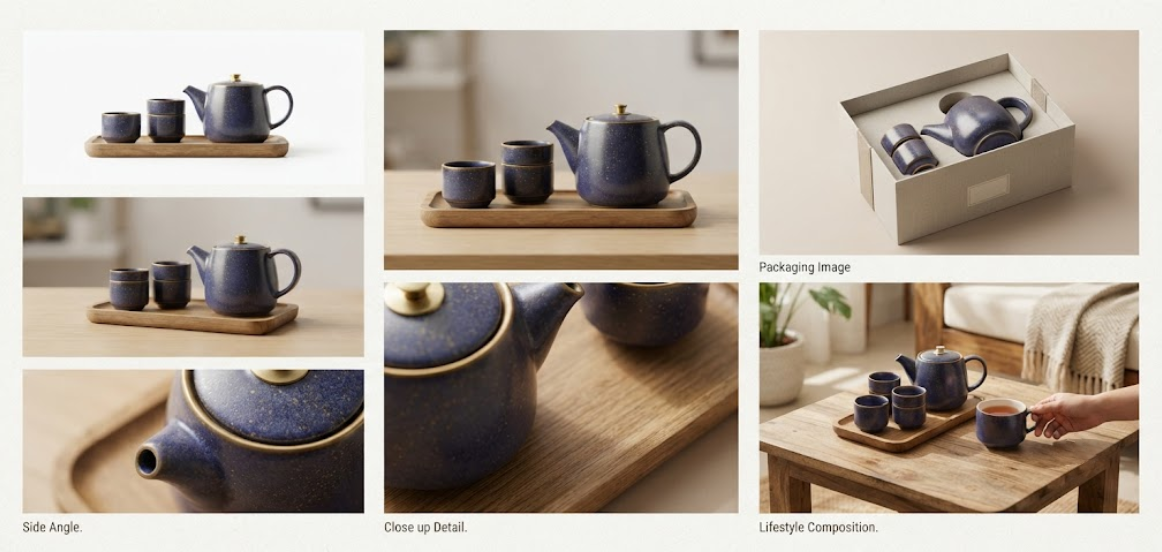
A professional product launch campaign should normally include several types of photographs rather than one repeated style.
Depending on the product, businesses may require:
- Main product photographs
- White-background catalogue images
- Multiple-angle photographs
- Detail photographs
- Lifestyle images
- Product-in-use photographs
- Packaging photographs
- Scale photographs
- Feature photographs
- Model photographs
- Creative campaign images
For e-commerce, the main product image is particularly important because it may be the first visual customers encounter.
Secondary photographs can then answer additional questions about the product.
MW Stuudio’s e-commerce photography service specifically plans image types according to platform requirements and product category, including catalogue and lifestyle photography.
Creating this shot list before the production day ensures that the photographer and brand team have the same expectations.
4. Prepare the Product Before the Photoshoot
Product preparation is one of the most overlooked parts of professional photography.
A product can be photographed perfectly, but if it arrives damaged, dusty, wrinkled or poorly assembled, the final image can still look disappointing.
Before the shoot, check:
- Product condition
- Packaging
- Labels
- Surface cleanliness
- Assembly
- Product colour
- Accessories
- Size variations
- Product variants
- Props
- Additional components
For fashion products, garments may need steaming.
For jewellery, surfaces may need careful cleaning.
For packaged products, labels should be positioned correctly.
For electronics, screens may need to be prepared.
For food, styling requirements should be planned.
A pre-shoot checklist can save significant time on production day.
MW Stuudio’s e-commerce photography process includes discussing product preparation during the pre-shoot brief so products arrive ready for photography.
5. Create a Visual Direction for the Launch
A product launch should have a visual identity.
Before the photoshoot, decide what the photography should feel like.
Possible directions include:
- Minimal and clean
- Premium and luxurious
- Modern and technology-focused
- Natural and organic
- Colourful and energetic
- Elegant and sophisticated
- Lifestyle-oriented
- Bold and youthful
The visual direction should match the product and target audience.
For example, a premium skincare brand might use soft lighting, elegant props and sophisticated neutral backgrounds.
A sports product may benefit from energetic lifestyle photography.
A technology product might use clean compositions and controlled lighting.
Creating a mood board can help the photographer, stylist, designer and marketing team work toward the same visual result.
6. Plan the Studio Setup and Lighting
Lighting has a major effect on how a product looks.
Professional lighting can reveal shape, texture, material, colour and detail while reducing unwanted reflections and shadows.
The lighting approach depends on the product.
For example:
Jewellery:
Precise lighting is required to control reflections and reveal metal and stones.
Cosmetics:
Lighting should communicate colour, texture and premium presentation.
Electronics:
Reflective surfaces require careful lighting and reflection management.
Food:
Lighting should reveal texture and make the product visually appealing.
Home decor:
Lighting should communicate both product detail and environmental context.
MW Stuudio’s studio environment is designed for professional photography with controlled lighting setups, and its photography services cover product, e-commerce, food, jewellery, fashion, lifestyle and personal branding photography.
7. Capture the Main Product Images First
The main product photographs should be prioritised during the shoot.
These images usually need to be:
- Sharp
- Well exposed
- Colour accurate
- Consistently framed
- Professionally lit
- Free from distracting elements
For marketplace listings, technical requirements can be particularly important.
For example, MW Stuudio’s current e-commerce photography workflow describes Amazon main-image requirements such as a pure white background, minimum image dimensions and the product occupying an appropriate portion of the frame. It also plans secondary image types to communicate features, usage and product details.
For a new launch, it is useful to photograph the main catalogue images before moving into more creative setups.
This creates a reliable foundation for the product listing.
8. Capture Multiple Angles and Important Details
Customers cannot physically inspect an online product.
Multiple photographs can help compensate for this limitation.
Depending on the product, consider photographing:
- Front
- Back
- Side
- Top
- Bottom
- Close-up
- Texture
- Controls
- Packaging
- Materials
- Important features
The objective is not to create unnecessary photographs.
Every image should provide useful information.
For example, a handbag customer may want to see the front, back, interior, handle, stitching and material texture.
An electronic product may need photographs showing ports, buttons, screen and accessories.
A jewellery product may need macro details of stones, metalwork and finish.
The more effectively the photography communicates the product, the less uncertainty the customer has before purchasing.
9. Add Lifestyle Photography to Create Context
Catalogue images explain what the product looks like.
Lifestyle photography explains how the product fits into real life.
This can be particularly powerful for a new product launch.
For example:
A skincare product can be photographed in a bathroom environment.
A home decor product can be styled inside a modern living room.
A fashion product can be photographed on a model.
A food product can be shown during a meal.
A fitness product can be shown during a workout.
Lifestyle photography creates emotional context and can help customers imagine themselves using the product.
MW Stuudio’s e-commerce photography services include both white-background catalogue photography and lifestyle photography, allowing brands to combine product clarity with contextual imagery.

10. Capture Photography for Social Media and Advertising
Your product photography campaign should not stop at the e-commerce listing.
The launch will probably need social media and advertising content as well.
During the same shoot, capture images suitable for:
- Instagram posts
- Instagram Stories
- Reels thumbnails
- Paid advertisements
- Website banners
- Email campaigns
- Promotional graphics
Social media often requires more creative compositions than marketplace listings.
For example, a product can be photographed with negative space on one side so that designers can later add campaign messaging.
A vertical composition may also be useful for mobile-first content.
Planning these requirements before the shoot prevents the need for another production session later.
11. Coordinate Product Photography With Video Content
A new product launch can benefit from both photographs and videos.
Instead of organising separate photography and video productions weeks apart, businesses can consider capturing both during the same production period.
A single product setup can potentially produce:
- Catalogue photographs
- Lifestyle photographs
- Product demonstration video
- Short Reel
- YouTube Short
- Product advertisement
- Website video
- Social media clips
This can improve consistency because the same lighting, styling and visual direction can be maintained across the assets.
MW Stuudio specifically offers product photography alongside video and Reel production, making combined content production possible within its broader studio workflow.
12. Plan the Post-Production and File Requirements
The shoot is only one part of the campaign.
After photography, images need to be processed and prepared for their final use.
Post-production may include:
- Colour correction
- Exposure adjustment
- Background cleanup
- Dust removal
- Retouching
- Shadow refinement
- Reflection control
- Cropping
- Sharpening
- Resizing
- File optimisation
The final images should also be delivered in an organised structure.
For example:
Product 01
- Main image
- Side image
- Detail image
- Lifestyle image
- Social media image
Product 02
- Main image
- Side image
- Detail image
- Lifestyle image
- Social media image
This organisation becomes particularly important when launching multiple products.
MW Stuudio’s workflow includes systematic post-production and platform-specific file preparation for marketplaces and D2C stores.
Conclusion
A successful new product launch requires more than placing a product on an online store.
Customers need clear, attractive and trustworthy visual information before they feel confident enough to consider a purchase.
That is why a professional product photography campaign for a new product launch should be planned well before launch day.
The process begins by identifying where the images will be used and understanding what customers need to see. From there, businesses can create a visual direction, prepare the products, plan lighting and styling, capture catalogue and lifestyle photographs, produce social media assets, coordinate video content, and organise professional post-production.
The biggest advantage of planning the campaign as a complete visual system is that one production session can support many marketing activities.
The same new product can have professional photographs for its website, marketplace listings, social media, email campaigns, advertising, catalogues and launch promotions.
For e-commerce brands, technical requirements are equally important. Product images need to be correctly framed, consistently produced and prepared for the platforms where they will be published. MW Stuudio’s e-commerce photography workflow includes platform-specific image preparation for marketplaces such as Amazon and Flipkart as well as D2C websites.
Businesses should therefore treat product photography as an important part of product-launch planning rather than an afterthought.
A well-planned campaign does more than make a product look attractive.
It helps customers understand the product, creates a consistent brand presentation, supports multiple marketing channels and gives the business a reusable visual library for future campaigns.
For brands launching a new product in Mumbai, working with a professional studio that can coordinate product photography, video, post-production and digital requirements can make the entire content-production process more efficient. MW Stuudio offers these services as part of its broader creative ecosystem.